
Building Relationships in Virtual Teaching
Virtual teaching is hard. It’s especially difficult when you’re starting from scratch with students. When we moved to virtual instruction last spring, we at least had six months of work with our students to start our experience together. This semester, you have a new roster and you may be wondering how to start to form those relationships. Kat and I came across a blog post on Teach, Train, Love with 33 suggestions on forming relationships with students before you’re actually able to meet face to face. The post is well worth reading, so head over there for the original. Kat...
Connect and Engage Your Students with a Digital Trivia Competition
I was looking for a fun and interactive way to connect and engage my students during online distance learning. I started hosting a digital trivia competition using Google Meet and Quizlet Live. This gives students a fun, laid-back way to connect with you and their classmates who they haven’t seen since leaving school in March. Plus, it allows you to sneak in some content review in a collaborative game at the same time. Win-win! If you’re not familiar with Quizlet, it’s an online learning platform that allows students to study information using digital flash cards, online games, and practice tests. One of...
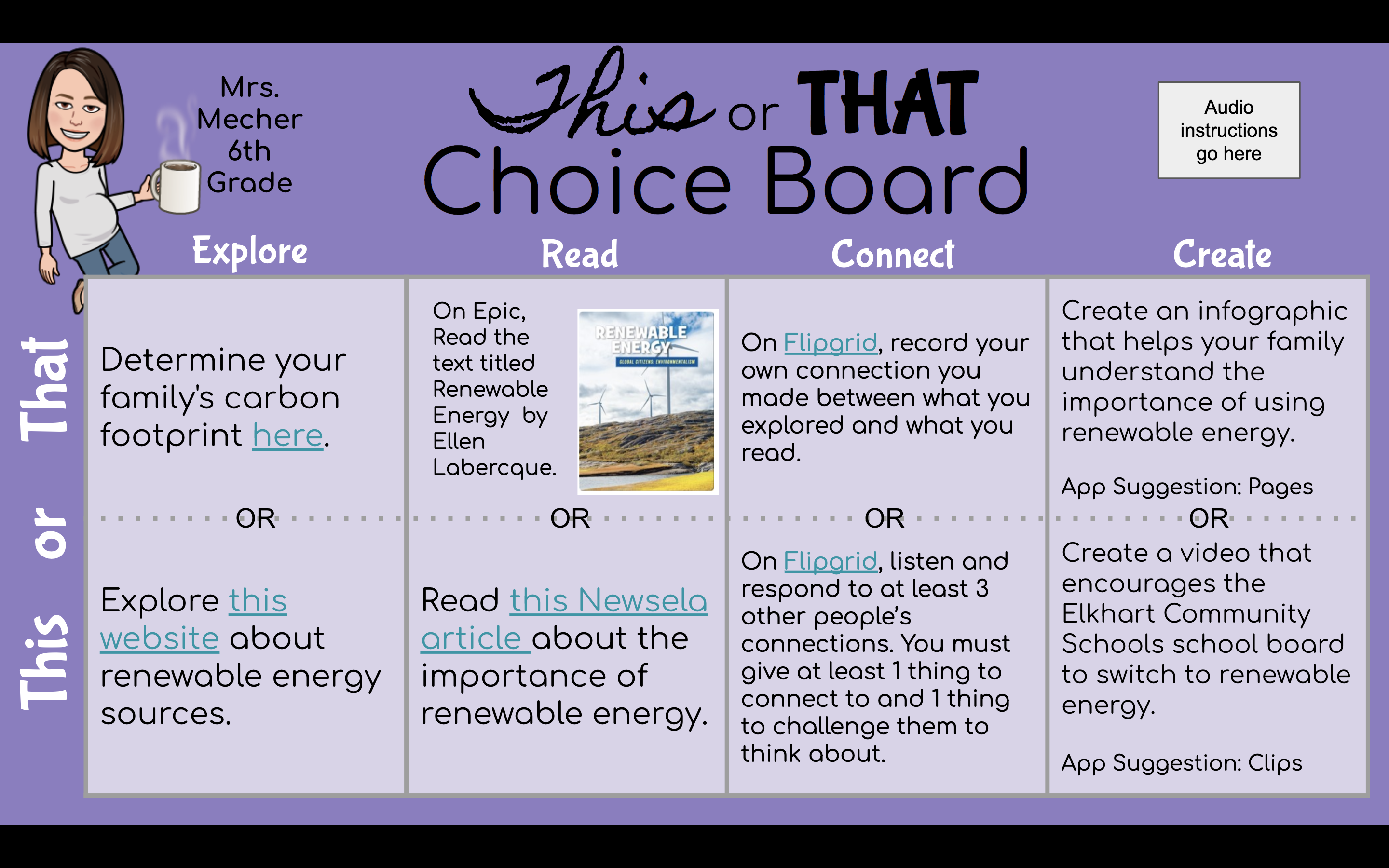
Using Choice Board to Engage and Empower
Does it feel like you are pulling teeth trying to get students to complete work? Do you feel like you spend all day working on planning the next assignment instead of spending your precious time giving students feedback and building relationships? I did, too. I started investing a little bit of time into building distance learning choice boards that have really helped me to increase my productivity through the week while also giving my students more ownership over their learning. What are choice boards, anyways? A choice board is a broad term for a method of allowing students to choose...
Message Students from Canvas by Course Activity
New Analytics has a lot of new interesting features that let you track what your students have or have not been doing in a course. We’ve already written about messaging by overall course grade, but one of the newest additions in features is the ability to message students by activity in the course, not just by grade. You can use this to target students that overlooked a certain assignment or contact those not looking at important aspects of your course. You can open New Analytics from the left hand menu. To message students by activity, go to the Weekly Online...
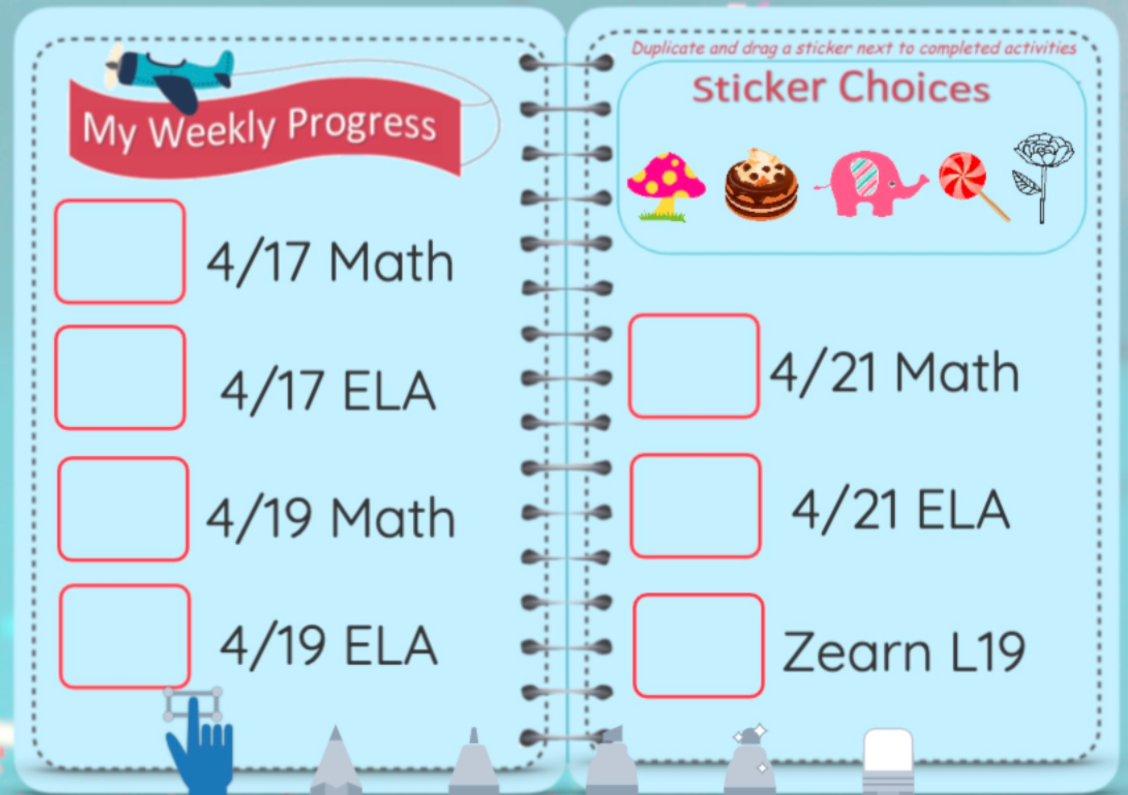
Motivational Reward and Progress Charts in Seesaw
How many of your students are not keeping up with their Seesaw assignments? How many parents actually know which assignments their student still needs to turn in? Since Seesaw isn’t designed to provide that feedback, I needed a way to let both students and parents know which assignments were complete. I also wanted it to motivate students. I decided to add a reward chart to each student’s journal page and update it with digital stickers to show their progress. Add a Reward Chart as a Student Post Create a new Post Student work and choose Drawing. Once in the drawing template, insert your reward...

PD and PLCs, Week of April 27th
This week, we’re going to change up the PD and PLC process slightly from weeks past. Kat and I have noticed a shift in the questions we’re getting and in the needs of staff across the district. To respond, we’re going to try an experiment with PD on Tuesday and the way we run PLC discussions on Thursday. All sessions are posted, and you can take a look now. Unified Professional Development Each PD session this week is geared toward general instruction and will include experts in ELL instruction, special education, high ability, and technology. The topics cover all grade...
Engaging Assessment Strategies That Don’t Need Screens
We all understand that we need to use our devices to conduct a lot of the instruction and assessments during this crisis learning situation. We also need to be considerate of the amount of time that we are asking students to work on screens. We cannot sacrifice good teaching strategies like movement, collaboration, critical thinking, and engineering while we’re away from buildings. The following activities are here to bring some creativity to your assessments. 3 Card Matching Game After assigning a list of vocabulary words for students to learn, have them create one card for each vocabulary word, one description card for...

How to Compress Videos with iMovie
Creating instructional videos for students is one effective method for working with students during distance learning. Streaming videos is bandwidth heavy and students with low speed Internet (or mobile Internet only) can be at a disadvantage because videos don’t work as well. You can help by compressing any videos you make to the smallest size possible before you publish it. This guide will show you how to use iMovie on your iPad to compress videos that are too large to upload in Seesaw and Canvas. If you don’t have iMovie on your iPad, you can install it from Self Service....

Add Canvas Course Announcements to your Home Page
If you are like me, you are using Announcements in Canvas frequently to keep students up to date on important information. They’re great because students are notified whenever one is sent from the course. I can manage communication from one location rather than going between Canvas and Gmail. There are two downsides: some students have turned their notifications off and they’re not displayed anywhere publicly when students log into the course. There is a fix for that! To add your most recent course Announcements to the top of your Home page, follow the steps below. In your course, go to...

Call a Phone from a Google Meet
Google Meet offers a way to call phone numbers from a meeting in progress for people who cannot join by video. This is also a way to make phone calls to families or parents without giving out our personal number. Once you have your Meet started, you can call a phone directly using the Add People option in the People menu. Change the settings to Call and then type in the phone number you want to call. The recipient will be placed right into the Meet room via their phone. When they hang up after the conversation, repeat for the...

Easily Send a Text to an Email Address
A little-known trick for communicating is sending a text message to an email address. Cell carriers will deliver that message to the email account from the phone. Plus, when the recipient replies, it will be delivered back to the sender’s phone! This can help close communication gaps with families without reliable internet access but who carry cell phones. Each cell carrier has a different email address, so start by getting the parent (or student) to contact you first. This can be the tricky part, to get the parent to send you the message first. Sending a Message Each phone is...

Customize Your Canvas Course Menu
The Canvas course menu is a powerful tool at your disposal for helping students navigate. You have the ability to customize which options are visible to students, which is helpful for getting them to the right place in very few clicks or taps. Before You Begin… Think through how you want them to access items in the course day to day. For some, this may be through Modules that you’re building. For others, you may be setting up Pages with links to weekly materials for students. Whatever method you choose, try to stick to one, consistent means for distributing assignments...

Streamlining Feedback for Students
Research has shown that in order for feedback to be most effective it needs to be given immediately rather than days, weeks or months later. Fully-online feedback can often be repetitive and time consuming when you’re trying give clear, constructive comments. In this post, I want to share three options to streamline how you provide detailed feedback. Canvas Rubrics Canvas Speedgrader Comments: Voice to Text, Audio Recording or Video Recording Create a master lists of comments in a spreadsheet of Google Keep Canvas Rubrics Canvas rubrics are tools where you can set up criteria in a score sheet that automatically populates...